Ficheros en Kotlin
Manejo de ficheros en Kotlin
Gestión de datos (2 – Ficheros)
I/O Streams
Lectura y Escritura de Ficheros en Java
Lectura y escritura en Kotlin
Exception Handling in Kotlin
Ejemplo: ficheros en Kotlin (en Intellij Idea)
import java.io.File
import java.io.IOException

fun main() {
    val ruta = "test.txt"
    val archivo = File(ruta)
    val texto = "hola\nun ejemplo de fichero\nadios"

    try {
        println("Manejo de ficheros")
        if (escribir(archivo, texto)) {
            println("Fichero $ruta escrito ok")
        }
        println("Archivo leído:\n" + leer(archivo))
    } catch (e: IOException) {
        println ("Error: " + e.message.toString())
    }

}

@Throws(IOException::class)
private fun escribir(fichero: File, cadena: String): Boolean {
    val correcto = true
    val bufferedWriter = fichero.bufferedWriter()
    bufferedWriter.write(cadena)
    bufferedWriter.close()

    return correcto
}

@Throws(IOException::class)
private fun leer(fichero: File): String {

    //val bufferedReader = fichero.bufferedReader()
    //val text: List<String> = bufferedReader.readLines()
    val inputString = fichero.bufferedReader ().use {
        it.readText ()
    }
    println (inputString)
    fichero.bufferedReader().close()

    //return text.toString()
    return inputString
}
Ejecución en consola:
Instalar Kotlin:
Kotlin command-line compiler
sudo snap install --classic kotlin

nano ficheros.kt

kotlinc ficheros.kt -include-runtime -d ficheros.jar

java -jar ficheros.jar
Ejemplo: Escribir / Leer un fichero en memoria externa
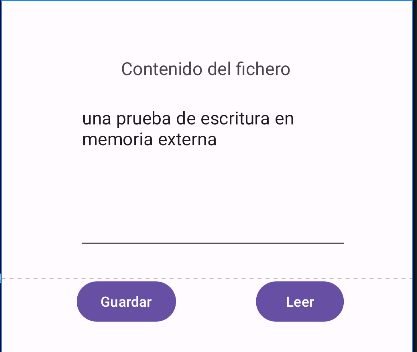
Crear un nuevo proyecto en Kotlin: FicherosKotlin2026
Añadir el permiso al manifiesto:
<uses-permission android:name="android.permission.WRITE_EXTERNAL_STORAGE"/>
build.gradle
    buildFeatures {
        viewBinding = true
    }
strings.xml
<resources>
    <string name="app_name">Ficheros Kotlin 2026</string>
    <string name="texto">una prueba de escritura en memoria externa</string>
    <string name="botonEscribir">Guardar</string>
    <string name="botonLeer">Leer</string>
    <string name="propiedades">Propiedades del fichero</string>
    <string name="contenido_del_fichero">Contenido del fichero</string>
</resources>
activity_main.xml
<?xml version = "1.0" encoding = "utf-8" ?>
<androidx.constraintlayout.widget.ConstraintLayout
    xmlns:android="http://schemas.android.com/apk/res/android"
    xmlns:app="http://schemas.android.com/apk/res-auto"
    xmlns:tools="http://schemas.android.com/tools"
    android:layout_width="match_parent"
    android:layout_height="match_parent"
    tools:context=".MainActivity">

    <TextView
        android:id="@+id/textView"
        android:layout_width="wrap_content"
        android:layout_height="wrap_content"
        android:layout_marginTop="40dp"
        android:text="@string/contenido_del_fichero"
        android:textAppearance="@style/TextAppearance.AppCompat.Medium"
        app:layout_constraintBottom_toTopOf="@+id/editText"
        app:layout_constraintEnd_toEndOf="parent"
        app:layout_constraintHorizontal_bias="0.498"
        app:layout_constraintStart_toStartOf="parent"
        app:layout_constraintTop_toTopOf="parent" />

    <EditText
        android:id="@+id/editText"
        android:layout_width="270dp"
        android:layout_height="156dp"
        android:layout_marginLeft="40dp"
        android:layout_marginTop="20dp"
        android:layout_marginEnd="64dp"
        android:ems="10"
        android:gravity="top|left"
        android:text="@string/texto"
        app:layout_constraintBottom_toBottomOf="parent"
        app:layout_constraintEnd_toEndOf="parent"
        app:layout_constraintLeft_toLeftOf="parent"
        app:layout_constraintTop_toTopOf="parent"
        app:layout_constraintVertical_bias="0.136" />

    <androidx.constraintlayout.widget.Guideline
        android:id="@+id/guideline"
        android:layout_width="wrap_content"
        android:layout_height="wrap_content"
        android:orientation="horizontal"
        app:layout_constraintGuide_begin="278dp" />

    <Button
        android:id="@+id/btnWrite"
        android:layout_width="wrap_content"
        android:layout_height="wrap_content"
        android:layout_marginLeft="36dp"
        android:layout_marginEnd="236dp"
        android:text="@string/botonEscribir"
        app:layout_constraintEnd_toEndOf="parent"
        app:layout_constraintLeft_toLeftOf="parent"
        app:layout_constraintTop_toTopOf="@+id/guideline" />

    <Button
        android:id="@+id/btnRead"
        android:layout_width="wrap_content"
        android:layout_height="wrap_content"
        android:layout_marginLeft="49dp"
        android:layout_marginEnd="68dp"
        android:text="@string/botonLeer"
        app:layout_constraintEnd_toEndOf="parent"
        app:layout_constraintLeft_toRightOf="@+id/btnWrite"
        app:layout_constraintTop_toTopOf="@+id/guideline" />


</androidx.constraintlayout.widget.ConstraintLayout>
MainActivity.kt
class MainActivity : AppCompatActivity(), View.OnClickListener {
    lateinit var binding: ActivityMainBinding

    companion object {
        const val FICHERO = "ficheroExterna.txt"
    }

    override fun onCreate(savedInstanceState: Bundle?) {
        super.onCreate(savedInstanceState)
        /*
        enableEdgeToEdge()
        setContentView(R.layout.activity_main)
        ViewCompat.setOnApplyWindowInsetsListener(findViewById(R.id.main)) { v, insets ->
            val systemBars = insets.getInsets(WindowInsetsCompat.Type.systemBars())
            v.setPadding(systemBars.left, systemBars.top, systemBars.right, systemBars.bottom)
            insets
         */

        setContentView(R.layout.activity_main)
        binding = ActivityMainBinding.inflate(layoutInflater)
        val view: View = binding.root
        setContentView(view)
        binding.btnWrite.setOnClickListener(this)
        binding.btnRead.setOnClickListener(this)
    }

    override fun onClick(v: View?) {
        if (v == binding.btnWrite) {
            writeFile(binding.editText.text.toString())
            val t = binding.editText.text.toString()
            writeMessage("contenido: $t")
        }
        else
            if (v == binding.btnRead)
                binding.editText.setText(readFile())
    }

    private fun writeMessage(string: String) {
        Toast.makeText(this, string, Toast.LENGTH_SHORT).show()
    }

    private fun writeFile(string: String) {
        var context: Context = this

        val estado = Environment.getExternalStorageState()
        if (estado == Environment.MEDIA_MOUNTED) {
            val file = File(context.getExternalFilesDir(null), FICHERO)
            try {
                OutputStreamWriter(FileOutputStream(file)).use {
                    fout -> fout.write(string)
                }
                writeMessage("Contenido escrito OK en $FICHERO")
            } catch (e: IOException) {
                e.printStackTrace()
                // Manejar el error (por ejemplo, mostrar mensaje)
                writeMessage("Error al escribir en la tarjeta SD")
            }
        } else {
            // La memoria externa no está disponible o montada
            // Manejar esta situación si es necesario
            writeMessage("La tarjeta SD no está disponible")
        }
    }

    private fun readFile(): String {
        val context: Context = this
        lateinit var text: String

        val file = File(context.getExternalFilesDir(null), FICHERO)
        if (file.exists()) {
            try {
                BufferedReader(InputStreamReader(FileInputStream(file))).use {
                    //br -> text = br.readLine()
                    br -> text = br.readText() // Ahora lee todas las líneas
                    // Procesar la línea leída
                }
                writeMessage("Contenido leido de $FICHERO")
            } catch (e: IOException) {
                e.printStackTrace()
                // Manejar el error (por ejemplo, mostrar mensaje)
                text = "Error al leer el fichero $FICHERO"
                writeMessage(text)
            }
        }
        else
            writeMessage("El fichero $FICHERO no existe")

        return text
    }
}
Tarea online: ejercicio 2
Deja una respuesta
Lo siento, debes estar conectado para publicar un comentario.