JSON en Kotlin con ViewModel
Uso de JSON en Kotlin con ViewModel, corutinas y OkHttp
Partiendo del ejercicio JSON en Kotlin, vamos a modificarlo para utilizar ViewModel y dentro de él descargar el fichero JSON desde una web usando OkHttp dentro de una corutina
Gemini:
modify the code of the app for using viewmodel and in the viewmodel download the file dam.org.es/ficheros/contactos.json using okhttp inside a coroutine
Resultado
Read build.gradle.kts
Read libs.versions.toml
Looked up the latest versions of okhttp, lifecycle-viewmodel-ktx, lifecycle-livedata-ktx, activity-ktx
Edited libs.versions.toml
Edited build.gradle.kts
Read AndroidManifest.xml
Edited AndroidManifest.xml
Read Persona.kt
Read Analisis.kt
Edited MainViewModel.kt
Edited MainViewModel.kt
Read ContactosAdapter.kt
Edited MainActivity.kt
Ran Gradle sync
Analyzed current file
Read MainActivity.kt
I have updated the application to use a ViewModel for managing data and performing network operations. Here's a summary of the changes:
1. Dependencies: Added OkHttp, ViewModel, LiveData, and Activity-KTX to libs.versions.toml and build.gradle.kts.
2. Permissions: Added INTERNET permission and enabled usesCleartextTraffic in AndroidManifest.xml (required for the http URL).
3. ViewModel: Created MainViewModel.kt which uses viewModelScope and OkHttp to download the JSON file in a background thread (via Dispatchers.IO) and updates LiveData with the results.
4. Activity: Refactored MainActivity.kt to observe the ViewModel's LiveData. It now triggers the download when the button is clicked and updates the RecyclerView automatically.
The app now follows the MVVM pattern and correctly handles network operations using coroutines and OkHttp.
Ficheros para colocar en el servidor web en Internet
Contactos.json
{
"contactos":[
  {
  "nombre": "Penélope Cruz",
  "direccion":"calle los remedios, 29007, malaga",
  "email":"angie@gmail.com",
  "telefono":{
    "casa": "952245407",
    "movil":"603459530",
    "trabajo":"951230246"
    }
  }
  ,
  {
  "nombre": "Blanca Suárez",
  "direccion":"calle hilera, 29010, malaga",
  "email":"nikole@gmail.com",
  "telefono":{
    "casa": "952233407",
    "movil":"625459540",
    "trabajo":"951230246"
    }
  }
,
  {
  "nombre": "Adriana Ugarte",
  "direccion":"calle larios, 29002, malaga",
  "email":"jenny@gmail.com",
  "telefono":{
    "casa": "951065407",
    "movil":"628659550",
    "trabajo":"952002146"
    }
  }
  ]
}
Contacts.json
{
  "contactos": [
    {
      "nombre": "Angelina Jolie",
      "direccion": "calle los remedios, 29007, malaga",
      "email": "angie@gmail.com",
      "telefono": {
        "casa": "952245407",
        "movil": "603459530",
        "trabajo": "951230246"
      }
    },
    {
      "nombre": "Nikole Kidman",
      "direccion": "calle hilera, 29010, malaga",
      "email": "nikole@gmail.com",
      "telefono": {
        "casa": "952233407",
        "movil": "625459540",
        "trabajo": "951230246"
      }
    },
    {
      "nombre": "Jennifer Lopez",
      "direccion": "calle larios, 29002, malaga",
      "email": "jenny@gmail.com",
      "telefono": {
        "casa": "951065407",
        "movil": "628659550",
        "trabajo": "952002146"
      }
    }
  ]
}
Conectarse por ssh con el servidor VPS y crear los ficheros
ssh usuario@alumno.me

cd /var/www/html
sudo su
mkdir ficheros
cd ficheros
nano contactos.json
nano contacts.json
Crear con Android Studio el proyecto ListaContactosDescarga
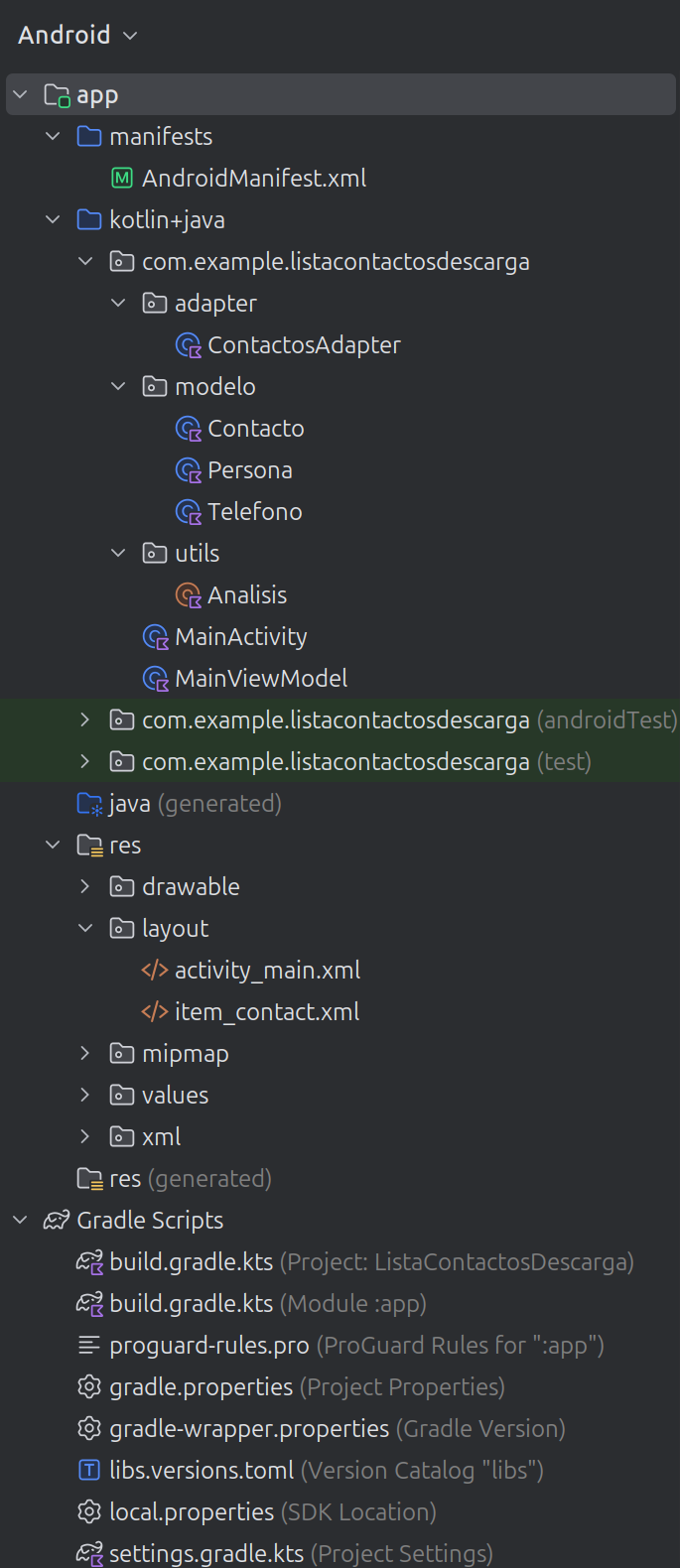
Dar el permiso de acceso a Internet en el manifiesto
AndroidManifest.xml
<uses-permission android:name="android.permission.INTERNET" />
Modificar libs.versions.toml para añadir las bibliotecas a utilizar: GSON, viewmodel, livedata corutinas y okhttp
[versions]
agp = "8.13.2"
kotlin = "2.1.0"
coreKtx = "1.17.0"
junit = "4.13.2"
junitVersion = "1.3.0"
espressoCore = "3.7.0"
appcompat = "1.7.1"
material = "1.13.0"
activity = "1.12.4"
constraintlayout = "2.2.1"
gson = "2.13.2"
okhttp = "4.12.0"
lifecycle = "2.10.0"

[libraries]
androidx-core-ktx = { group = "androidx.core", name = "core-ktx", version.ref = "coreKtx" }
junit = { group = "junit", name = "junit", version.ref = "junit" }
androidx-junit = { group = "androidx.test.ext", name = "junit", version.ref = "junitVersion" }
androidx-espresso-core = { group = "androidx.test.espresso", name = "espresso-core", version.ref = "espressoCore" }
androidx-appcompat = { group = "androidx.appcompat", name = "appcompat", version.ref = "appcompat" }
material = { group = "com.google.android.material", name = "material", version.ref = "material" }
androidx-activity = { group = "androidx.activity", name = "activity", version.ref = "activity" }
androidx-constraintlayout = { group = "androidx.constraintlayout", name = "constraintlayout", version.ref = "constraintlayout" }
gson = { module = "com.google.code.gson:gson", version.ref = "gson" }
okhttp = { group = "com.squareup.okhttp3", name = "okhttp", version.ref = "okhttp" }
androidx-lifecycle-viewmodel-ktx = { group = "androidx.lifecycle", name = "lifecycle-viewmodel-ktx", version.ref = "lifecycle" }
androidx-lifecycle-livedata-ktx = { group = "androidx.lifecycle", name = "lifecycle-livedata-ktx", version.ref = "lifecycle" }
androidx-activity-ktx = { group = "androidx.activity", name = "activity-ktx", version.ref = "activity" }

[plugins]
android-application = { id = "com.android.application", version.ref = "agp" }
kotlin-android = { id = "org.jetbrains.kotlin.android", version.ref = "kotlin" }
Modificar build.gradle (del módulo) para añadir view binding y las bibliotecas a utilizar: GSON, viewmodel, livedata corutinas y okhttp
plugins {
    alias(libs.plugins.android.application)
    alias(libs.plugins.kotlin.android)
}

android {
    namespace = "com.example.listacontactosdescarga"
    compileSdk {
        version = release(36)
    }

    buildFeatures {
        viewBinding = true
    }

    defaultConfig {
        applicationId = "com.example.listacontactosdescarga"
        minSdk = 28
        targetSdk = 36
        versionCode = 1
        versionName = "1.0"

        testInstrumentationRunner = "androidx.test.runner.AndroidJUnitRunner"
    }

    buildTypes {
        release {
            isMinifyEnabled = false
            proguardFiles(
                getDefaultProguardFile("proguard-android-optimize.txt"),
                "proguard-rules.pro"
            )
        }
    }
    compileOptions {
        sourceCompatibility = JavaVersion.VERSION_17
        targetCompatibility = JavaVersion.VERSION_17
    }
    kotlinOptions {
        jvmTarget = "17"
    }

}

dependencies {
    implementation(libs.androidx.core.ktx)
    implementation(libs.androidx.appcompat)
    implementation(libs.material)
    implementation(libs.androidx.activity)
    implementation(libs.androidx.constraintlayout)

    implementation (libs.gson)
    implementation (libs.okhttp)
    implementation (libs.androidx.lifecycle.viewmodel.ktx)
    implementation (libs.androidx.lifecycle.livedata.ktx)
    implementation (libs.androidx.activity.ktx)

    testImplementation(libs.junit)
    androidTestImplementation(libs.androidx.junit)
    androidTestImplementation(libs.androidx.espresso.core)
}
modelo/Telefono
data class Telefono(
    @SerializedName("casa")
    val casa: String,
    @SerializedName("movil")
    val movil: String,
    @SerializedName("trabajo")
    val trabajo: String
)
modelo/Contacto
data class Contacto(
    @SerializedName("nombre")
    val nombre: String,
    @SerializedName("direccion")
    val direccion: String,
    @SerializedName("email")
    val email: String,
    @SerializedName("telefono")
    val telefono: Telefono
)
modelo/Persona
data class Persona(
    @SerializedName("contactos")
    val contactos: ArrayList<Contacto>
)
item_contact.xml
<?xml version="1.0" encoding="utf-8"?>
<LinearLayout
    xmlns:android="http://schemas.android.com/apk/res/android"
    android:layout_width="match_parent"
    android:layout_height="wrap_content"
    android:orientation="vertical"
    android:paddingTop="10dp"
    android:paddingBottom="10dp">

    <TextView
        android:id="@+id/contact_name"
        android:layout_width="match_parent"
        android:layout_height="wrap_content"
        android:layout_weight="1"
        android:text="name"
        android:textAppearance="@style/TextAppearance.AppCompat.Large"
        android:textColor="#2196F3" />

    <TextView
        android:id="@+id/mobile_phone"
        android:layout_width="match_parent"
        android:layout_height="wrap_content"
        android:layout_weight="1"
        android:text="TextView" />

</LinearLayout>
adapter/ContactosAdapter
class ContactosAdapter(private var mContactos: List<Contacto>) : RecyclerView.Adapter<ContactosAdapter.ViewHolder>() {

    inner class ViewHolder(itemView: View) : RecyclerView.ViewHolder(itemView) {
        val binding = ItemContactBinding.bind(itemView)
    }

    override fun onCreateViewHolder(
        parent: ViewGroup,
        viewType: Int
    ): ViewHolder {
        val context = parent.context
        val inflater = LayoutInflater.from(context)
        val contactView = inflater.inflate(R.layout.item_contact, parent, false)

        return ViewHolder(contactView)
    }

    override fun onBindViewHolder(holder: ViewHolder, position: Int) {
        // Get the data model based on position
        val contact = mContactos[position]

        // Set item views based on your views and data model
        holder.binding.contactName.text = contact.nombre
        holder.binding.mobilePhone.text = contact.telefono.movil
    }

    // Returns the total count of items in the list
    override fun getItemCount(): Int {
        return mContactos.size
    }

    fun actualizar(data: List<Contacto>) {
        mContactos = data
        notifyDataSetChanged()
    }
}
utils/Analisis
object Analisis {

    @Throws(JSONException::class)
    fun analizarContactos(cadena: String?): ArrayList<Contacto> {
        val jAcontactos: JSONArray
        val objeto: JSONObject
        var jOcontacto: JSONObject
        var jOtelefono: JSONObject
        var contacto: Contacto
        var telefono: Telefono
        val personas = ArrayList<Contacto>()
        // añadir contactos (en formato JSON) a personas
        objeto = JSONObject(cadena)
        jAcontactos = objeto.getJSONArray("contactos")
        for (i in 0 until jAcontactos.length()) {
            jOcontacto = jAcontactos.getJSONObject(i)
            jOtelefono = jOcontacto.getJSONObject("telefono")
            telefono = Telefono(jOtelefono.getString("casa"), jOtelefono.getString("movil"), jOtelefono.getString("trabajo"))
            contacto = Contacto(jOcontacto.getString("nombre"), jOcontacto.getString("direccion"), jOcontacto.getString("email"), telefono)
            personas.add(contacto)
        }
        return personas
    }
}
MainViewModel
class MainViewModel : ViewModel() {

    private val _contactos = MutableLiveData<List<Contacto>>()
    val contactos: LiveData<List<Contacto>> get() = _contactos

    private val _error = MutableLiveData<String>()
    val error: LiveData<String> get() = _error

    private val _mensaje = MutableLiveData<String>()
    val mensaje: LiveData<String> get() = _mensaje

    private val client = OkHttpClient()

    fun descargarContactos(url:String, usarGson: Boolean) {
        viewModelScope.launch {
            try {
                val result = withContext(Dispatchers.IO) {
                    val request = Request.Builder().url(url).build()

                    client.newCall(request).execute().use { response ->
                        if (!response.isSuccessful)
                            throw IOException("Unexpected code $response")
                        response.body?.string() ?: ""

                    }
                }

                _mensaje.value = "Contactos descargados OK"

                val lista = if (usarGson) {
                    val persona = Gson().fromJson(result, Persona::class.java)
                    persona.contactos
                } else {
                    Analisis.analizarContactos(result)
                }
                _contactos.value = lista
            } catch (e: Exception) {
                _error.value = e.message ?: "Error desconocido"
            }
        }
    }
}
activity_main.xml
<?xml version="1.0" encoding="utf-8"?>
<androidx.constraintlayout.widget.ConstraintLayout
    xmlns:android="http://schemas.android.com/apk/res/android"
    xmlns:app="http://schemas.android.com/apk/res-auto"
    xmlns:tools="http://schemas.android.com/tools"
    android:layout_width="match_parent"
    android:layout_height="match_parent"
    tools:context=".MainActivity">

    <TextView
        android:id="@+id/textView"
        android:layout_width="wrap_content"
        android:layout_height="wrap_content"
        android:text="Lista de contactos"
        app:layout_constraintBottom_toBottomOf="parent"
        app:layout_constraintHorizontal_bias="0.498"
        app:layout_constraintLeft_toLeftOf="parent"
        app:layout_constraintRight_toRightOf="parent"
        app:layout_constraintTop_toTopOf="parent"
        app:layout_constraintVertical_bias="0.022" />

    <Switch
        android:id="@+id/switch1"
        android:layout_width="94dp"
        android:layout_height="48dp"
        android:checked="false"
        android:text="Gson"
        app:layout_constraintEnd_toEndOf="parent"
        app:layout_constraintHorizontal_bias="0.95"
        app:layout_constraintStart_toStartOf="parent"
        app:layout_constraintTop_toBottomOf="@+id/textView" />

    <Button
        android:id="@+id/button"
        android:layout_width="wrap_content"
        android:layout_height="wrap_content"
        android:layout_marginTop="24dp"
        android:layout_marginBottom="16dp"
        android:text="Mostrar"
        app:layout_constraintBottom_toTopOf="@+id/recyclerView"
        app:layout_constraintEnd_toEndOf="parent"
        app:layout_constraintHorizontal_bias="0.462"
        app:layout_constraintStart_toStartOf="parent"
        app:layout_constraintTop_toBottomOf="@+id/textView" />

    <androidx.recyclerview.widget.RecyclerView
        android:id="@+id/recyclerView"
        android:layout_width="362dp"
        android:layout_height="561dp"
        android:layout_marginBottom="28dp"
        app:layout_constraintBottom_toBottomOf="parent"
        app:layout_constraintEnd_toEndOf="parent"
        app:layout_constraintHorizontal_bias="0.326"
        app:layout_constraintStart_toStartOf="parent"
        app:layout_constraintTop_toBottomOf="@+id/button" />

</androidx.constraintlayout.widget.ConstraintLayout>
MainActivity
class MainActivity : AppCompatActivity(), View.OnClickListener {
    private lateinit var binding: ActivityMainBinding
    private lateinit var adapter: ContactosAdapter
    private val viewModel: MainViewModel by viewModels()

    companion object {
        const val CONTACTOS = "https://dam.org.es/ficheros/contactos.json"
        const val CONTACTS = "https://dam.org.es/ficheros/contacts.json"
    }

    override fun onCreate(savedInstanceState: Bundle?) {
        super.onCreate(savedInstanceState)
        binding = ActivityMainBinding.inflate(layoutInflater)
        setContentView(binding.root)

        binding.button.setOnClickListener(this)

        setupRecyclerView()
        observeViewModel()
    }

    private fun setupRecyclerView() {
        adapter = ContactosAdapter(emptyList())
        binding.recyclerView.adapter = adapter
        binding.recyclerView.layoutManager = LinearLayoutManager(this)
    }

    private fun observeViewModel() {
        viewModel.contactos.observe(this) { contactos ->
            if (contactos.isNotEmpty()) {
                adapter.actualizar(contactos)
            } else {
                mostrarMensaje("No se encontraron contactos")
            }
        }

        viewModel.error.observe(this) { errorMessage ->
            mostrarMensaje("Error: $errorMessage")
        }

        viewModel.mensaje.observe(this) { texto ->
            // Call your local function here
            mostrarMensaje(texto)
        }
    }

    override fun onClick(v: View) {
        if (v === binding.button) {
            if (!binding.switch1.isChecked)
                viewModel.descargarContactos(CONTACTOS, false)
            else
                viewModel.descargarContactos(CONTACTS, true)
        }
    }

    private fun mostrarMensaje(texto: String) {
        Toast.makeText(this, texto, Toast.LENGTH_SHORT).show()
    }
}
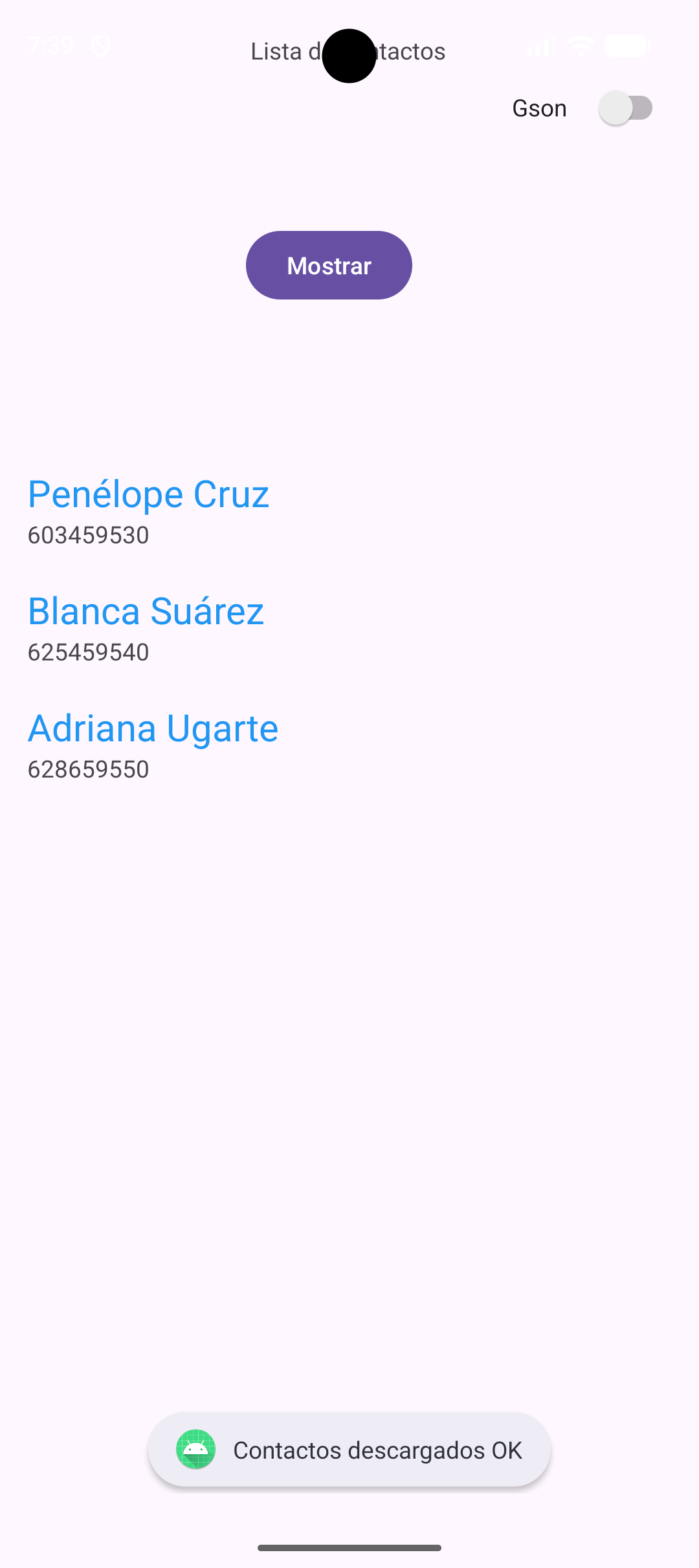
Comprobar posibles errores al descargar el archivo json:
const val CONTACTOS = "https://dam.org.es/ficheros/contactosmal.json"
Deja una respuesta
Lo siento, debes estar conectado para publicar un comentario.